
Google AI Portfolio Explained: Workspace, Expanded & Ultra


Google’s AI strategy for business has evolved rapidly along with its product naming conventions, licensing structure, and positioning. As a result, many leadership teams are looking for clarity.
Executives are asking:
- What AI features are already included in Google Workspace?
- What is AI Expanded Access?
- What is AI Ultra Access?
- What happened to Gemini Business and Gemini Enterprise?
- How does Gemini Enterprise (the platform) differ from Gemini in Workspace?
- What services are covered under Workspace enterprise terms, and which are not?
This guide provides Google Workspace AI tiers explained in clear terms. It offers a practical Gemini add-on comparison and a structured breakdown of Google AI licensing explained so leadership teams can make informed decisions.
While this article focuses on Gemini within Google Workspace and Gemini Enterprise, organizations building custom AI applications, deploying advanced models across enterprise data, or developing AI-powered products should also evaluate Vertex AI within Google Cloud. Vertex AI search serves a different purpose than Workspace-embedded Gemini, it is designed for model development, customization, and large-scale AI deployment beyond productivity tools.
What AI Is Already Included in Google Workspace?
Today, most Google Workspace Business and Enterprise editions already include significant AI capabilities by default.
Standard AI features embedded in Workspace apps include:
- Help me write in Gmail
- Help me create in Docs
- Take notes for me in Meet
- AI assistance in Sheets
- Gemini app access
- NotebookLM for Workspace users
These features are designed for everyday productivity and are included in Business and Enterprise Standard and Plus plans with defined usage limits. For many organizations, this level of AI access is sufficient and does not require an additional add-on.
What Is AI Expanded Access?
AI Expanded Access is a paid add-on designed for users who need higher usage limits and expanded AI capabilities. When evaluating AI Expanded Access vs AI Ultra Access, Expanded Access serves as the middle tier for growing AI adoption.
Google positions it as the “Better” tier for progressive AI users.
It includes:
- Higher usage limits across advanced AI features
- Expanded image generation (Nano Banana Pro)
- Expanded video generation (Veo models)
- Increased NotebookLM capacity
- Workspace Studio automation
- Real-time speech translation (rolling out)
Expanded Access does not introduce exclusive tools. Instead, it increases limits and unlocks more advanced functionality within Workspace.
It is best suited for:
- Marketing teams
- Content creators
- Operations leaders
- High-volume AI users
List price begins at $20/user/month with annual commitment.
Important: Core Services vs Additional Services
One of the most important parts of Google AI licensing explained is understanding Core Services versus Additional Services.
Core Services covered under Workspace enterprise terms include:
- Gemini app
- NotebookLM
- Gemini in Workspace apps
These are governed under Google Workspace enterprise terms and maintain enterprise-grade privacy protections.
Additional Services (Separate Terms of Service)
- Flow
- Whisk
- Project Mariner
- Google Antigravity
- Gemini CLI
- Gemini Code Assist
These operate under separate terms of service and may use interactions for model training. For regulated industries, this distinction is critical. Executives must clearly understand which tools fall under enterprise compliance frameworks and which do not.
What Is AI Ultra Access?
AI Ultra Access is the highest AI tier available as a Workspace add-on. It was previously named “Google AI Ultra for Business” and has been renamed for most Workspace customers. When comparing AI Expanded Access vs AI Ultra Access, Ultra is designed for specialized and high intensity AI usage.
Ultra Access includes:
- Highest usage limits across AI models
- Priority traffic and first access to new models
- Google Antigravity (agentic development platform)
- Gemini CLI
- Gemini Code Assist
- Highest limits in Flow and Whisk
- 25,000 monthly Flow credits
Ultra is designed for:
- Developers
- AI engineers
- Creative production teams
- Advanced research users
Unlike Expanded Access, Ultra includes an optional overage model that allows users to continue using AI after monthly credits are consumed. This prevents productivity interruptions for high-volume users.
What Is Gemini Enterprise?
This is where confusion is most common.
Gemini Enterprise is not simply a higher Workspace AI tier. It is a separate agentic platform built on Google Cloud. Understanding Gemini Enterprise vs Workspace is essential for strategic planning.
Google Workspace with Gemini focuses on AI embedded inside everyday productivity tools such as Gmail, Docs, Sheets, and Meet. Its primary focus is individual and team productivity.
Gemini Enterprise, by contrast, is an enterprise platform designed to build, govern, and scale AI agents across business systems. Its focus is organization wide automation, cross application workflows, and AI agent orchestration.
Gemini Enterprise connects data across:
- Google Workspace
- Microsoft 365
- Enterprise systems
- Cloud infrastructure
It is positioned as an enterprise AI platform rather than a productivity enhancement tool. It serves a different buyer, a different budget, and a different use case.
What Happened to Legacy Gemini Business and Gemini Enterprise Add-Ons?
Legacy Gemini Business and Gemini Enterprise add-ons are no longer sold. For many Business and Enterprise Standard/Plus customers, Gemini functionality is now included in the core Workspace license.
Organizations with legacy add-ons should review:
- Current AI usage
- Whether Expanded Access is needed
- Whether features would be lost if removed
Removing legacy licenses without evaluation can reduce available AI functionality. This requires careful planning.
How Should Executives Think About the Portfolio?
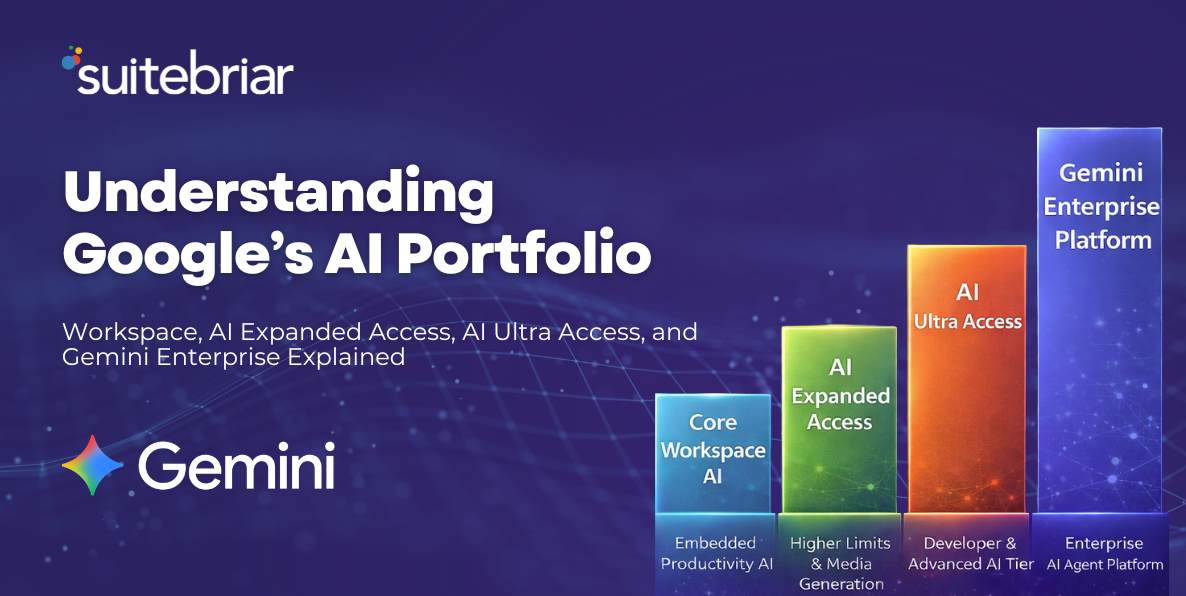
Here is a simplified executive framework within Google Workspace AI tiers explained.
If your goal is:
-
AI inside Gmail, Docs, Sheets → Core Workspace AI
-
Higher AI limits, media generation, automation inside Workspace → AI Expanded Access
-
Advanced AI development, high-volume content creation, agentic workflows inside Workspace → AI Ultra Access
-
Enterprise-wide AI agents, cross-system automation, governed AI platform → Gemini Enterprise
This structure aligns AI investment with business maturity and strategic intent.
The Strategic Implication
Google’s AI portfolio now spans:
- Embedded productivity AI
- Tiered usage expansion
- Developer-grade AI access
- Enterprise agent platforms
Without a clear strategy, organizations risk overlicensing, underutilizing advanced features, confusion around terms of service, and misalignment between IT and business units. The opportunity is to design AI access intentionally.
Is Your AI Licensing Strategy Aligned?
Many organizations still do not fully understand Google AI licensing, explained in practical business terms.
They often:
- Don’t know which AI features are already included
- Are unsure whether they need Expanded or Ultra
- Are confused about Gemini Enterprise
- Haven’t mapped AI access to roles
- Haven’t evaluated compliance implications
Suitebriar helps organizations:
- Audit current AI usage and licensing
- Design mixed AI tier strategies
- Align AI features to job roles
- Evaluate compliance boundaries
- Forecast AI expansion costs
- Build a roadmap toward enterprise AI maturity
If your leadership team needs clarity on Google Workspace AI tiers explained and a structured Gemini add-on comparison tailored to your organization, schedule a strategic AI licensing review.
.png?width=150&height=150&name=Blog%20Slide%20(1).png)
-1.png?width=150&height=150&name=Copy%20of%20Blog%20Slide%20(1)-1.png)