

The Browser is the New Endpoint: Why You Need Chrome Browser Cloud Management


The Browser is the New Endpoint: Why You Need Chrome Browser Cloud Management
If you analyze the daily workflow of your average employee, over 90% of their time is spent inside a browser window.
The operating system (Windows or macOS) has become merely a bootloader for the browser. Modern work happens in the browser: identity, SaaS apps, AI tools, and sensitive data all flow through it. Yet, for many organizations, the browser remains the "Wild West" of the IT environment: unmanaged, unpatched, and full of risky or unauthorized extensions. This creates a modern attack surface, exposing organizations to credential phishing, data leaks via personal profiles, and threats from outdated or vulnerable browser versions.
If you are still relying on on-premise Group Policy Objects (GPO) to manage Chrome, or worse, not managing it at all, you are fighting a modern war with ancient weapons.
What is Chrome Browser Cloud Management (CBCM)?
CBCM is Google’s unified, cloud-native control plane for managing Chrome. It allows IT administrators to enforce policies, manage extensions, and access telemetry across Windows, macOS, and Linux desktops (with limited policy support on Chrome for iOS and Android) from a single dashboard: the Google Admin Console.
Because CBCM is cloud-native, a laptop sitting in a coffee shop receives critical security patch policies just as fast as a desktop sitting in headquarters. No VPN, no on-premises server, and no heavy agents, Chrome browser itself acts as the agent.
The Problem with Legacy Management (GPO)
Why move away from GPOs? They were designed for a world where every computer was plugged into the office network.
- Latency: Policies only update when devices connect to the VPN or domain controller.
- Invisibility: GPOs are “fire and forget.” You push a policy, but you have no real-time reporting to confirm it was applied or to see which version of Chrome is actually running.
- OS Dependency: GPOs work well for Windows, but what about Macs or Linux? You end up with fragmented management strategies.
- Policy Conflicts: Mixing GPO and CBCM can create unexpected precedence issues if not carefully planned.
How Chrome Browser Cloud Management Works (The "Secret Sauce")
The architecture is surprisingly simple, yet powerful. It relies on an Enrollment Token.
- Generate: You generate a token in the Google Workspace Admin Console.
- Deploy: You push that token to your devices via your method of choice (GPO, MDM like Intune/Jamf, or a simple script). This places the token in the Registry (Windows) or Plist (Mac).
- Enroll: Chrome sees the token, "phones home" to Google, and pulls down your policies.
Additional operational considerations:
- Tokens can be rotated periodically for security.
- Devices can be unenrolled when retired or repurposed.
- Policies follow the OU hierarchy, allowing staged or segmented rollout.
The Two Tiers: Core vs. Premium
Google Workspace offers this solution in two flavors. It is vital to understand the difference so you don't overspend or under-protect.
1. Chrome Browser Enterprise Core (The "Must-Have")
Cost: Free.
Who it is for: IT Operations & Desktop Engineering Teams.
This version is available to anyone with a Google Workspace Admin domain (even a free Cloud Identity account). It gives you the operational control you need to run a healthy fleet.
- Centralized Management: Set homepages, enforce update cadences (e.g., force a relaunch within 24 hours of an update), and manage bookmarks.
- Granular Extension Management: This is the "Killer App" of CBCM.
- Block/Allow: Block all extensions by default and only whitelist approved ones.
- Permissions: Block extensions based on what they ask for (e.g., block any extension that requests access to the clipboard or webcam).
- Force-Install: Automatically push critical tools (like password managers or security plugins) to every user.
- Version Visibility: See version fragmentation across your fleet to identify vulnerable machines instantly. You can finally answer the auditor's question: "How many devices are running a Chrome version older than X?"
2. Chrome Browser Enterprise Premium (The "Security Layer")
Cost: Paid License (Per user).
Who it is for: Security Operations (SecOps) & Compliance Teams.
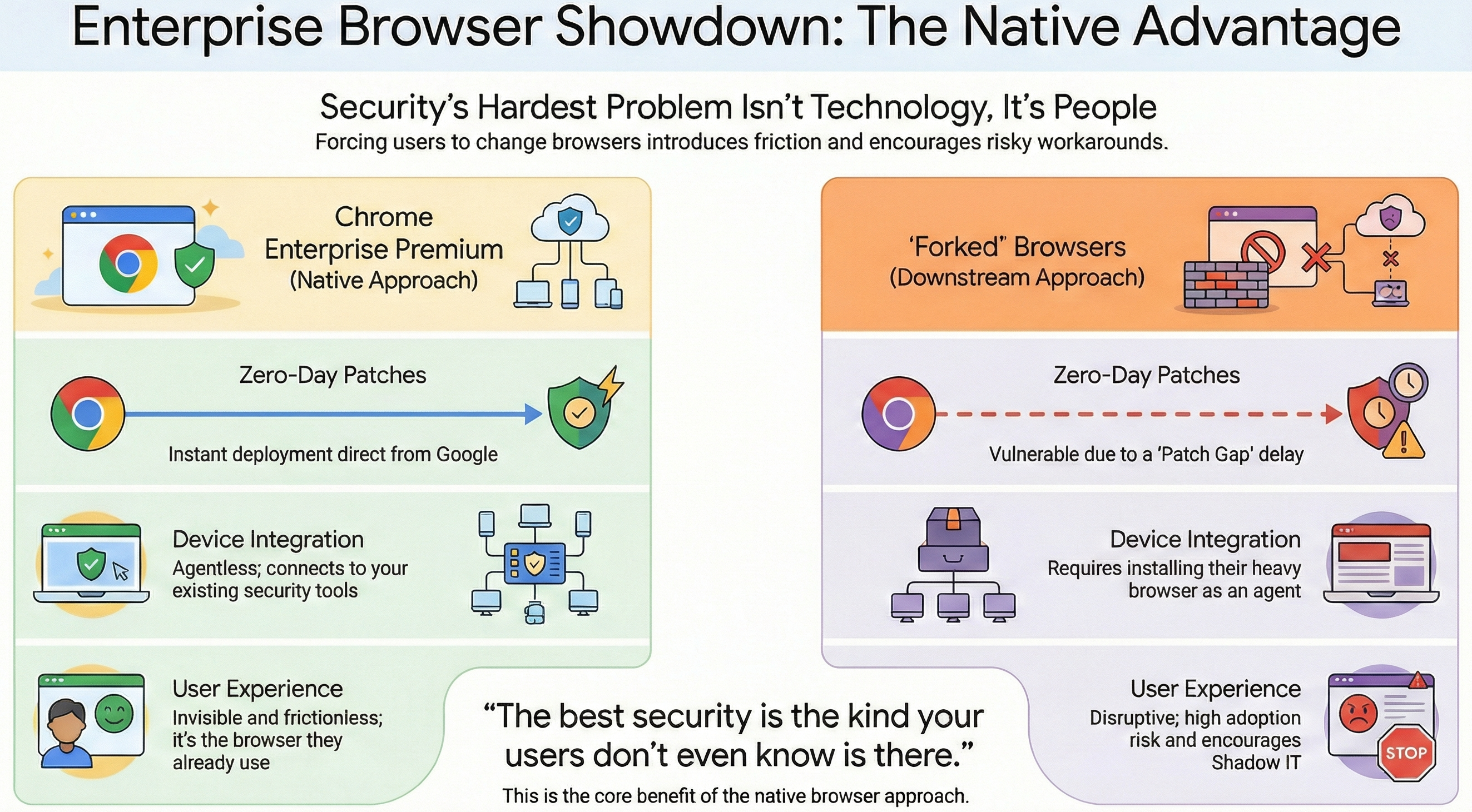
Formerly known as "BeyondCorp Enterprise," this tier transforms the browser from a managed application into a Zero Trust enforcement point.
- Zero Trust Enforcement: Integrate device health checks with SaaS access.
- Data Loss Prevention (DLP) & GenAI Protection: Prevent sensitive data from being pasted into AI tools, personal webmail, or social media.
- Real-Time Malware Scanning: Scan downloads and uploads against Google’s threat intelligence database.
- Context-Aware Access: Restrict SaaS app access if devices are outdated or security controls (firewall, OS patching) are disabled.
- Advanced Reporting & SIEM Integration: Export browser telemetry to Splunk, Chronicle, or other XDR platforms.
Premium transforms Chrome into a critical security enforcement point rather than just a managed application.
Better Together: Third-Party Integrations
One often overlooked benefit of CBCM is how well it plays with your existing security stack.
- SIEM Integration: Pipe Chrome security events directly into Splunk or Google Chronicle for analysis.
- CrowdStrike & Palo Alto: Share signals between the browser and your XDR platforms to identify compromised devices faster.
For most organizations, Chrome Enterprise Core is the starting point. It costs nothing, secures extensions, and ensures browsers are patched wherever users work. Once operational control is achieved, teams can evaluate Premium for advanced DLP, malware scanning, and Zero Trust enforcement.
Stop treating the browser like just another app. Start managing it like the critical infrastructure it has become.
Ready to secure your browser fleet? Contact Suitebriar today to get started with a Chrome Browser Audit.
Check out our other blog posts on ChromeOS & Google Ecosystem:
.png?width=150&height=150&name=Blog%20Slide%20(1).png)

-1.jpg)
.jpg)